
- No.
- 02
- To
- Figma · AI feature
- From
- Phagwara
- Captured
- 19.10.2026
- Published
- 19.10.2026
- Revised
- 20.10.2026
- Region
- US
Ten changes to how Figma explains what Make costs
How Figma prices Figma Make, marked up from its public pages: the credits in each seat, the add-on, the docs, and the ten changes I would make.
How Figma prices Figma Make: the credits in each seat, the add-on, the docs.
Not affiliated with Figma
Want one for your page? A Teardown: US$950, 5 working days
Figma Make’s own page figma.com/make · 1440 and 390 px · 19.10.2026
Changes 02: Tell Make’s own visitors what Make runs on
Figma Make is the prompt-to-app tool inside Figma, from Figma, Inc., San Francisco: you describe what you want and it builds a working prototype or web app. Each prompt uses AI credits, which come with Figma’s seats or are bought on top. On Monday 19 October 2026 I read the public pages that explain what Make costs, at 1440 px and 390 px wide, and marked what I would change, in order.
Much of it is done well. Every paid seat shows its monthly credits beside its price. The help article prints a fixed cost for each image tool, model by model, and is plain about running out, about undoing a prompt (no refund) and about fixing Make’s own errors (free). A worked example shows the order of spending, and Make’s six other models are named. These changes are about where a team budgeting for Make has to stop and guess.
Ten changes, in order
Put the add-on’s prices on the pricing page
 Seen in Fig. 3. Show it on the figure.no price on the cardrev. 20.10
Seen, why, try
Seen. The pricing page’s “AI credits” add-on, “Purchase additional AI credits for your whole team to share—enable pay-as-you-go for flexibility and/or subscribe to save”, shows no price. Its “Learn more” leads to the help article “Manage AI credits”, where the pay-as-you-go rate is shown “from the Add credits flow in your admin dashboard”. The AI credit updates FAQ says the same (Fig. 3). No public page I read prices either option.
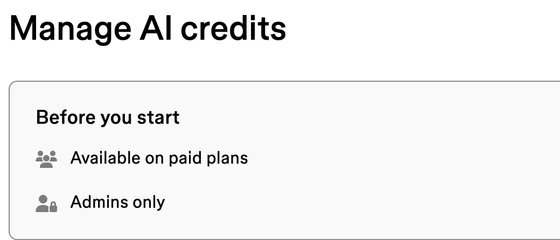
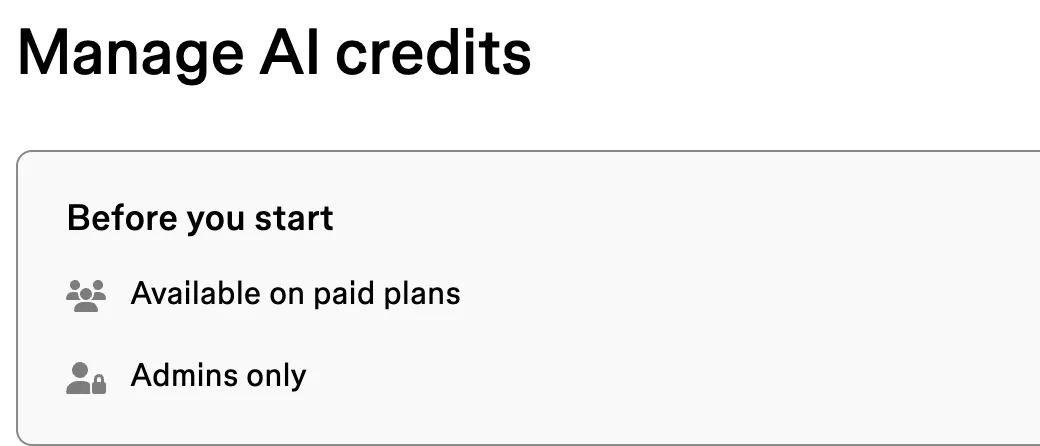
Why it matters. Figma’s help says seat credits “allow you to try Figma AI and see what it can do”, and “For ongoing, everyday use across your team, your admin can add more credits” (the inset). So everyday use of Make has the one cost a buyer cannot see before buying. The help article on buying credits is marked “Available on paid plans” and “Admins only” (the inset under change 08): whoever approves the spend learns the price once the team is on a paid plan, or from sales.
Try. A short table under the plan cards: each subscription tier (credits and price a month), the pay-as-you-go rate per 1,000 credits, and the date of the prices. “Subscribe to save” then has figures behind it.
 , open it full size
Inset What the credits in each seat are for help.figma.com · How Figma AI credits work · 1440 px · 19.10.2026 Tell Make’s own visitors what Make runs on
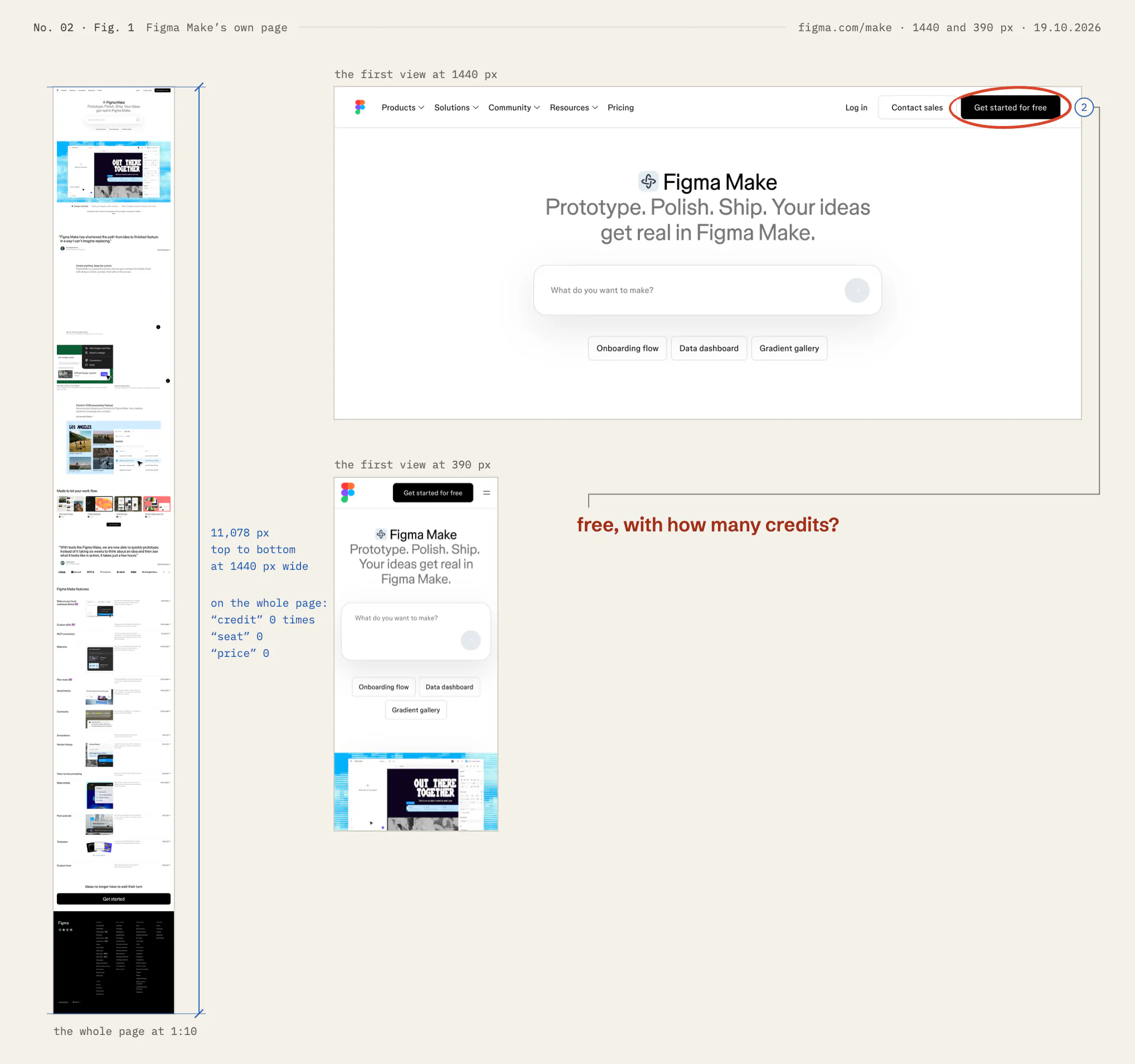
 Seen in Fig. 1. Show it on the figure.free, with how many credits?
Seen, why, try
Seen. figma.com/make is 11,078 px long at 1440 px and never uses the words credit, seat or price; the way to a price is the Pricing link in the menu and the footer. Its button says “Get started for free” (Fig. 1).
Why it matters. The free start is real: the free Starter plan includes 150 AI credits a day, up to 500 a month. But a visitor who reads only this page learns what Make does and nothing about what it uses up. By Figma’s own example a new app from scratch takes about 100 credits or more, so a free day covers one and not two (my arithmetic).
Try. One line under the prompt box: “Make runs on AI credits: 150 a day on the free plan, 3,000 a month with a Professional Full seat. A new app takes about 100 or more.” Then a link to the credits on the pricing page.
Replace “100+” with a typical figure and a ceiling
 Seen in Fig. 4. Show it on the figure.a floor, with no ceiling
Seen, why, try
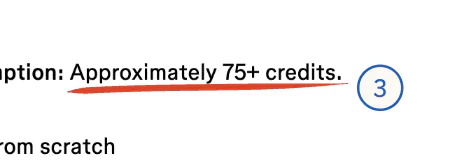
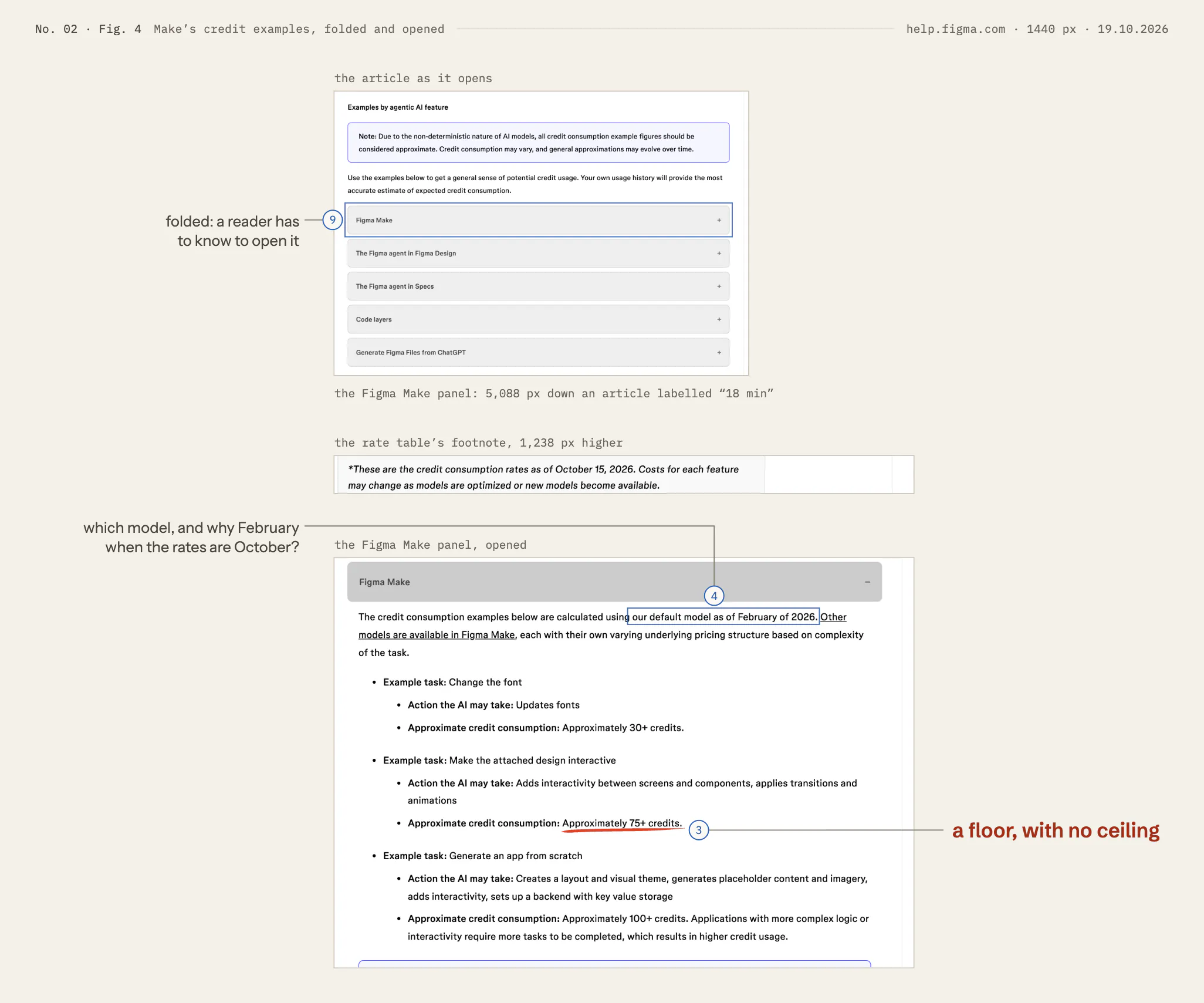
Seen. The help article gives three Make examples: changing the font, “Approximately 30+ credits”; making an attached design interactive, 75+; generating an app from scratch, 100+ (Fig. 4). Each is a floor. The same article says that your own usage history “will provide the most accurate estimate”.
Why it matters. A floor tells a buyer the least a task can cost, not what it usually costs. Against a Professional Full seat’s 3,000 credits a month, “100+” means at most 30 apps from scratch, perhaps far fewer, and the page cannot say which. The usage history the article points to already exists: Make shows each prompt’s cost once it has run.
Try. For each example, the median and the 90th percentile from real use, with the model and the month: “Generate an app from scratch: typically [median], nine in ten under [90th percentile]. Auto, October 2026.”
Name the default model, and date the examples to it
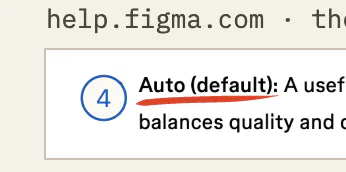 Seen in Fig. 5. Show it on the figure.two names for the defaultrev. 20.10
Seen, why, try
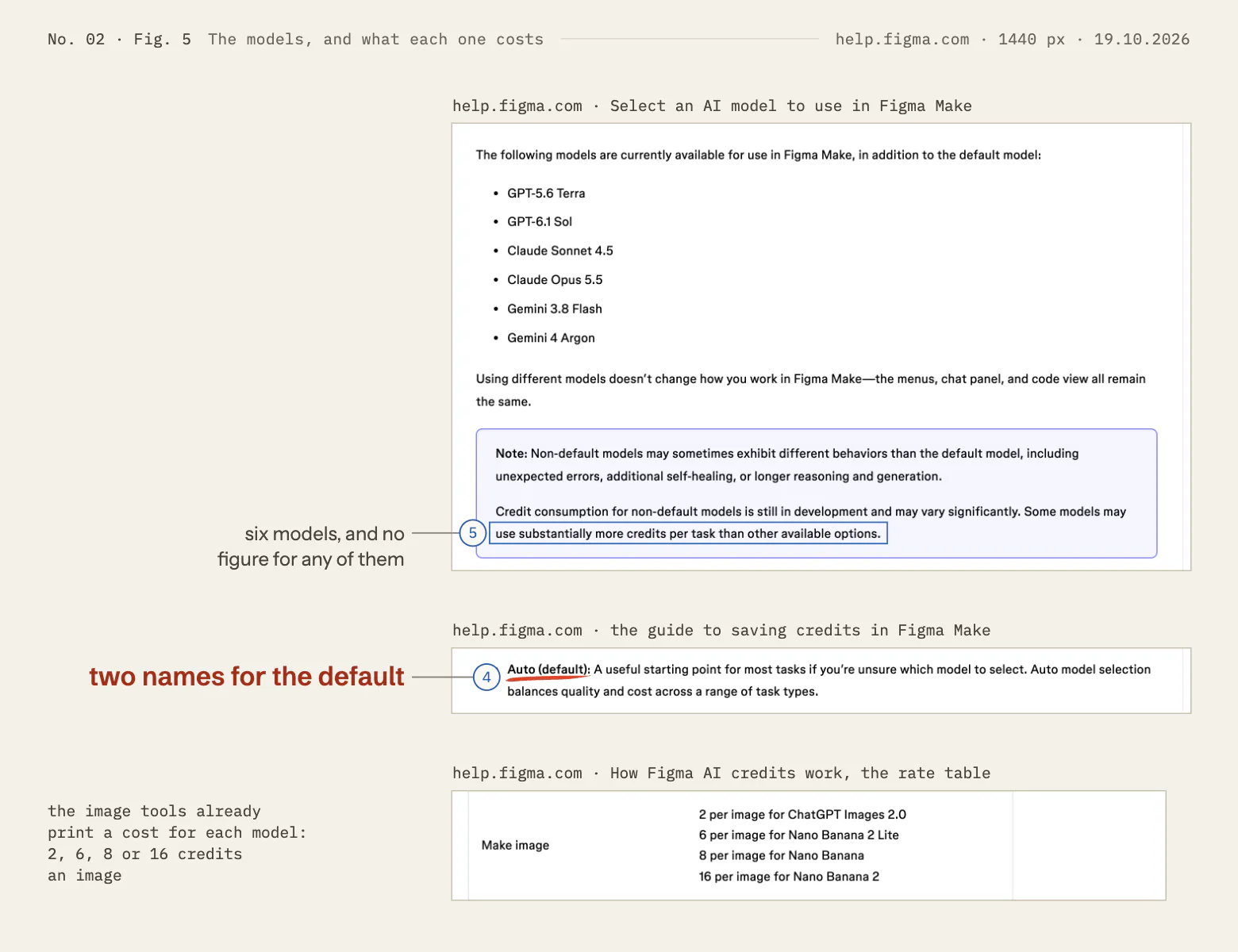
Seen. The Make examples are “calculated using our default model as of February of 2026”, under a rate table dated “as of October 15, 2026” (Fig. 4). The help page on models lists six models “in addition to the default model”. Figma’s guide to saving credits in Make calls it “Auto (default)” (Fig. 5).
Why it matters. The only figures for Make are about eight months older than the rates beside them, measured on a default that one page calls “the default model” and another “Auto”, and no page says which model that was in February. A buyer cannot tell whether they still hold.
Try. Say in one sentence what Auto is (one model, or a choice among several for each prompt), use that one name everywhere, and measure the examples again whenever the rates are dated.
Put a relative cost beside each model
 Seen in Fig. 5. Show it on the figure.six models, and no figure for any of themrev. 20.10
Seen, why, try
Seen. Make’s model list names GPT‑5.6 Terra, GPT‑6.1 Sol, Claude Sonnet 4.5, Claude Opus 5.5, Gemini 3.8 Flash and Gemini 4 Argon: models from OpenAI, Anthropic and Google. On cost it gives no figures: credit consumption for these models “is still in development and may vary significantly”, and some “use substantially more credits per task” (Fig. 5). Figma’s guide to saving credits calls Gemini Flash “the most credit-efficient option for straightforward tasks” (the inset).
Why it matters. The model is chosen in the chat box, as the user works, and “substantially more” could mean twice as much or ten times. Figma’s article on how credits work already prints a fixed cost per model for the image tools: 2, 6, 8 or 16 credits an image.
Try. A multiplier against Auto for each model, from the same usage data as change 3 and dated like the rates, in the help page and beside each name in the picker.
 , open it full size
Inset Gemini Flash, in the guide to saving credits help.figma.com · the guide to saving credits in Make · 1440 px · 19.10.2026 Show what a prompt is likely to cost before it runs
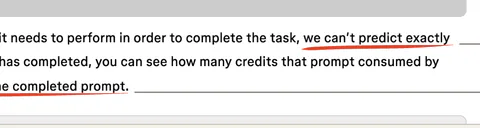 Seen in Fig. 6. Show it on the figure.shown only after it runsrev. 20.10
Seen, why, try
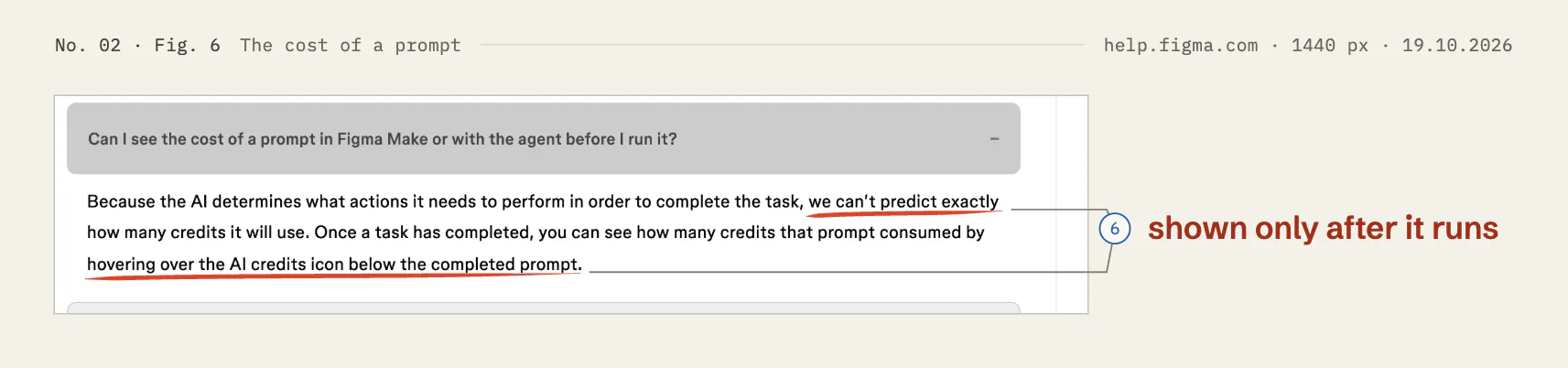
Seen. The help article asks “Can I see the cost of a prompt in Figma Make or with the agent before I run it?” Its answer: “we can’t predict exactly how many credits it will use”, and the cost is shown afterwards, by hovering over the credits icon under the finished prompt (Fig. 6). I found nothing on the pages I read about credits running out while a prompt runs.
Why it matters. On a free day of 150 credits, one prompt of 100 or more can use most of the day, and the user learns that once it has been spent. Someone who cannot see the price of a prompt has a reason to send fewer of them.
Try. Before a prompt is sent, a range drawn from similar prompts (“usually between [low] and [high] credits”) and an optional ceiling (“stop and ask me above [n]”). In the docs, one sentence on what happens when credits run out partway through a prompt.
Name Make in words on the seats that include it
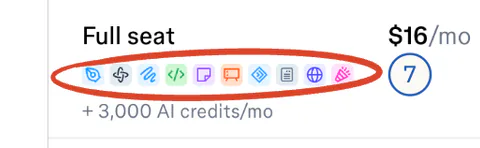 Seen in Fig. 2. Show it on the figure.Make: one icon in tenrev. 20.10
Seen, why, try
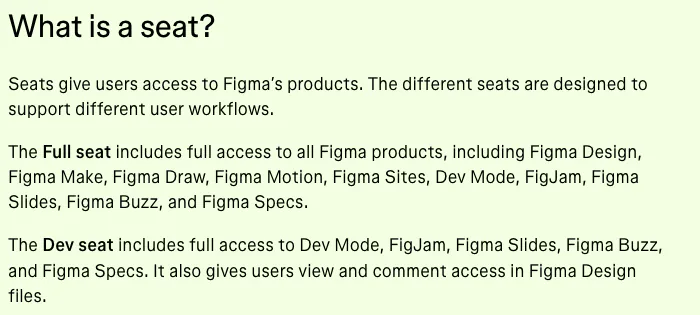
Seen. On the plan cards each seat has a row of 16 px product icons and a credit line. Make’s icon is the second of ten on Full seats and is absent from Dev and Collab seats, which still show “+ 500 AI credits/mo” (Fig. 2). The words are further down, in the FAQ answer to “What is a seat?” (the inset).
Why it matters. A buyer choosing seats for Make has to match a 16 px icon to the row of product names above the cards, and can easily read a Dev or Collab seat’s 500 credits as credits for Make.
Try. Put it in words on the card: “Full seat: every product, Make included”; on Dev and Collab seats, “500 AI credits a month, for the products in this seat (not Make)”.
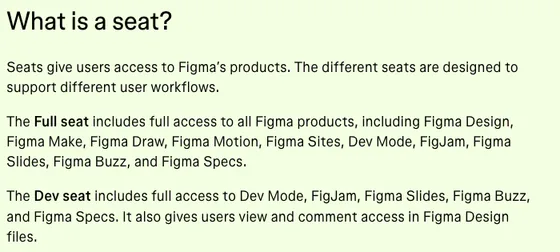 , open it full size
Inset The FAQ: “What is a seat?” figma.com/pricing · Pricing FAQs · 1440 px · 19.10.2026 Make the banner match the rule
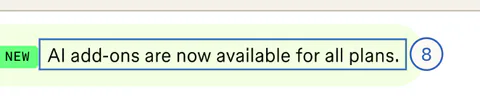 Seen in Fig. 2. Show it on the figure.all plans, or every paid plan?rev. 20.10
Seen, why, try
Seen. Above the plan cards, under a “NEW” badge: “AI add-ons are now available for all plans.” (Fig. 2). The help article on buying credits is marked “Available on paid plans” and “Admins only” (the inset), and Starter, the free plan, is one of the four plans on the page.
Why it matters. A Starter user who reads the banner, uses up the day’s 150 credits and looks for the add-on will find it is not offered to them.
Try. “AI credit add-ons are now available on every paid plan.” And on Starter’s card, the step up in one line: “Need more? A Professional Full seat includes 3,000 a month.”
 , open it full size
Inset Buying credits: who can help.figma.com · Manage AI credits · 1440 px · 19.10.2026 Unfold the Make examples, and link straight to them
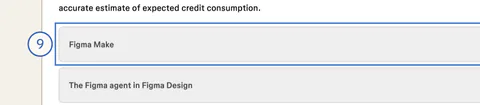 Seen in Fig. 4. Show it on the figure.folded: a reader has to know to open it
Seen, why, try
Seen. The Make examples sit in a folded panel, 5,088 px down an article the page labels “18 min” (Fig. 4). The pricing page’s FAQ on credits links to the top of that article.
Why it matters. These three lines are the nearest thing on any public page to a price for a Make prompt, and a buyer who does not scroll that far, or does not think to open the panel, never sees them.
Try. Open the panel by default, give it an address of its own (“#figma-make”), and link to it from the pricing page’s credits FAQ and from Make’s own page.
On a phone, show Starter’s credits on the card
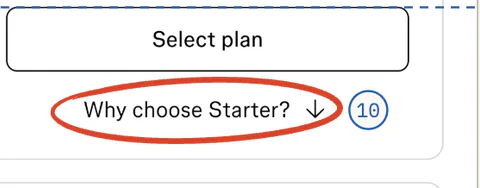 Seen in Fig. 7. Show it on the figure.Starter’s credits, folded awayrev. 20.10
Seen, why, try
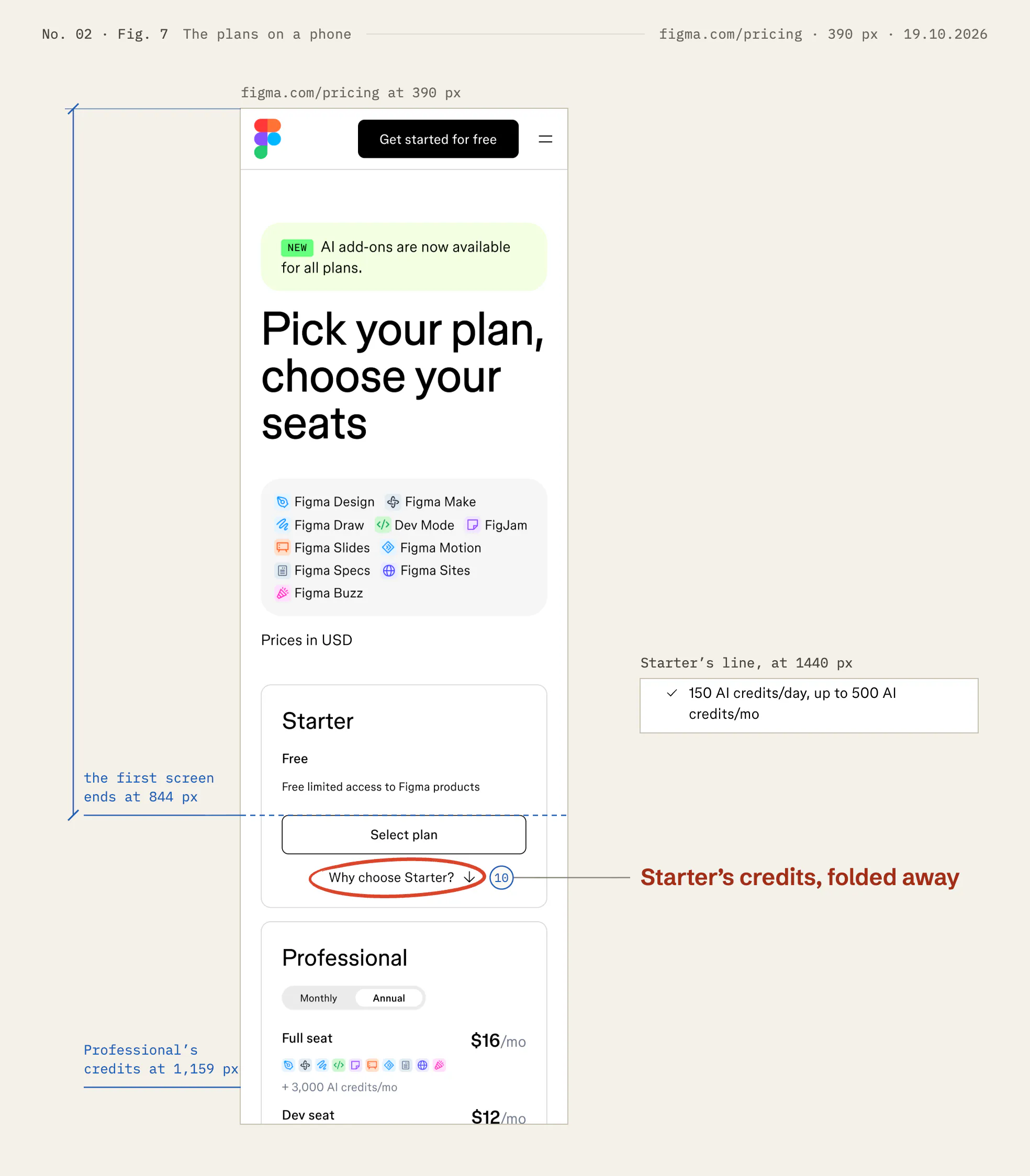
Seen. At 390 px each paid seat shows its credits on the card; Professional’s “+ 3,000 AI credits/mo” is 1,159 px down the page. Starter’s “150 AI credits/day, up to 500 AI credits/mo”, shown openly at 1440 px, is folded inside “Why choose Starter?”, below a first screen of 844 px (Fig. 7). The pricing FAQ gives Starter’s 500 a month and leaves out the 150 a day.
Why it matters. On a phone the free plan is the only one whose AI allowance is out of sight, and it is the one with a daily limit.
Try. One line under “Free”: “150 AI credits a day, up to 500 a month”, and the same daily limit in the FAQ answer.


(01)Figures
The pages, marked up
Each change is framed and carries its number from the list above; the one that matters most in each figure is ringed in red. Every blue figure was measured on the page itself. Fig. 4 and Fig. 6 show panels opened by clicking them, as a reader would. Each figure opens full size.
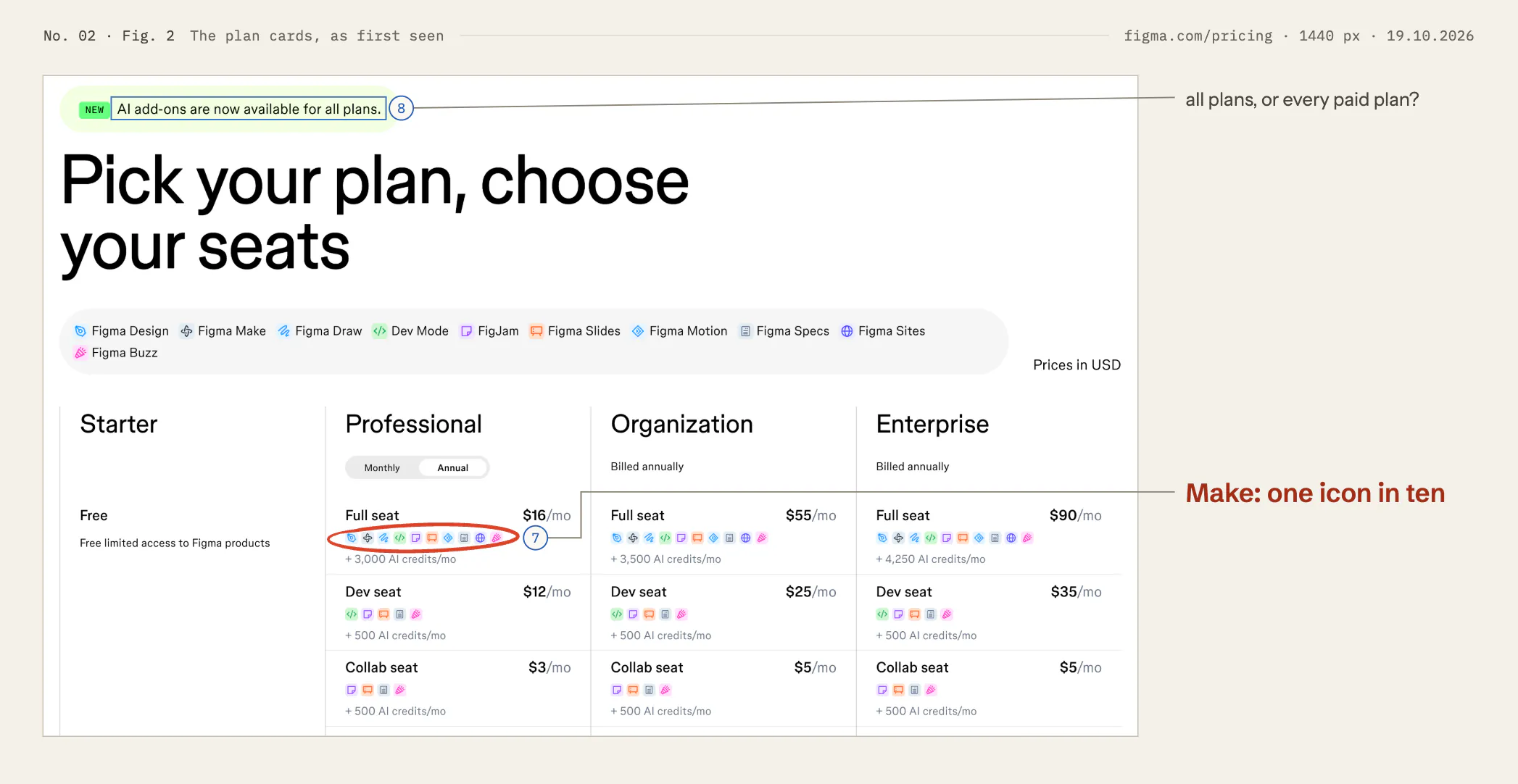
The plan cards, as first seen figma.com/pricing · 1440 px · 19.10.2026
Changes 07: Name Make in words on the seats that include it 08: Make the banner match the rule
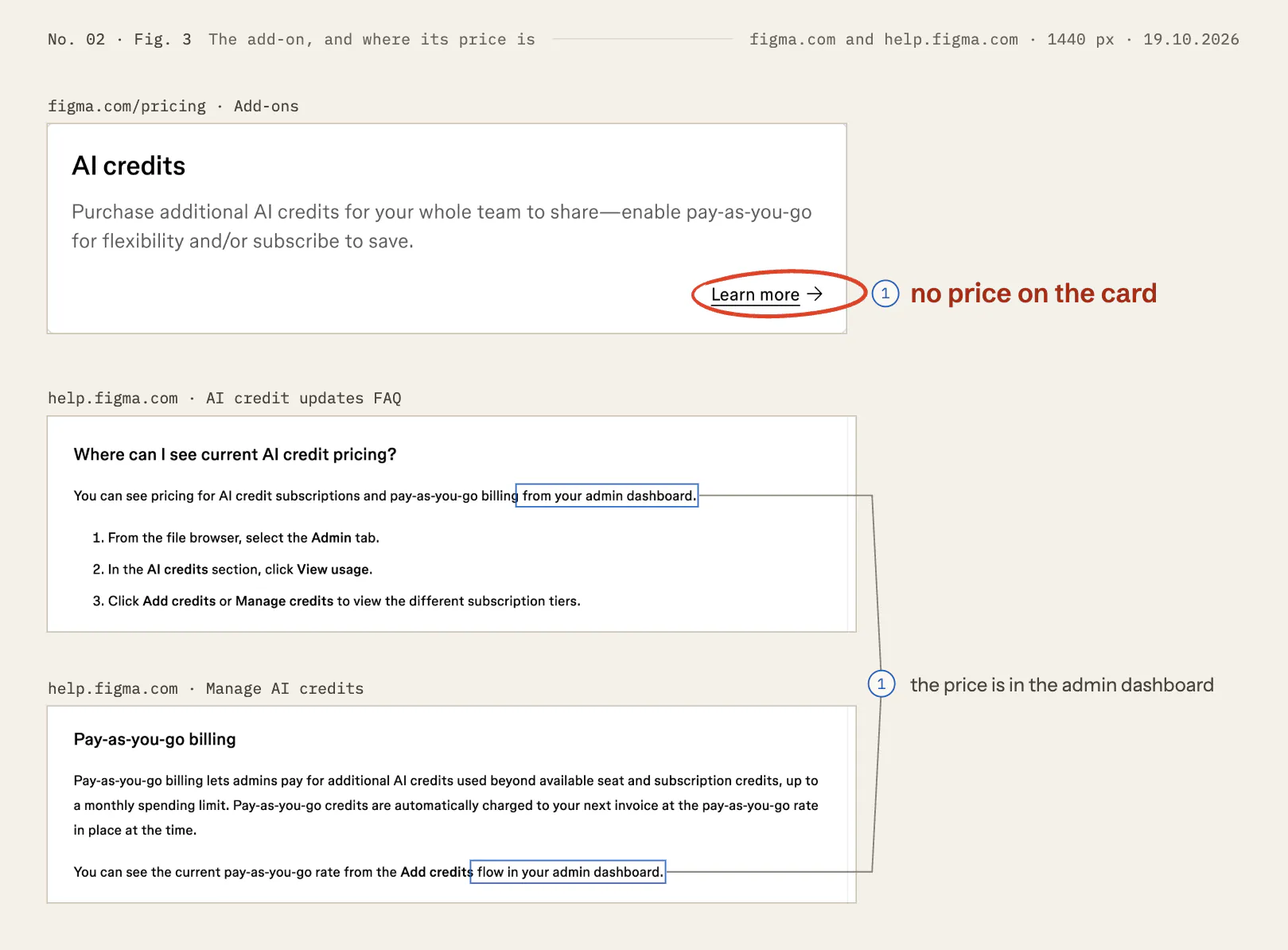
The add-on, and where its price is figma.com and help.figma.com · 1440 px · 19.10.2026
Changes 01: Put the add-on’s prices on the pricing page
Make’s credit examples, folded and opened help.figma.com · 1440 px · 19.10.2026
Changes 03: Replace “100+” with a typical figure and a ceiling 04: Name the default model, and date the examples to it 09: Unfold the Make examples, and link straight to them
The models, and what each one costs help.figma.com · 1440 px · 19.10.2026
Changes 04: Name the default model, and date the examples to it 05: Put a relative cost beside each model
The cost of a prompt help.figma.com · 1440 px · 19.10.2026
Changes 06: Show what a prompt is likely to cost before it runs
The plans on a phone figma.com/pricing · 390 px · 19.10.2026
Changes 10: On a phone, show Starter’s credits on the card
(02)TestsSuggested, not run
What I’d test first
The add-on’s prices on the pricing page (change 1). Show half of pricing-page visitors a table of add-on prices under the cards, and half today’s card. Measure the share of new paid teams whose admin adds AI credits within 30 days, and the share of their Make users who meet an empty balance. Watch Full-seat upgrades as the guardrail: published credit prices should not replace a seat upgrade the team would have bought. Agree beforehand the smallest difference worth acting on, and run for at least two full weeks.
Make’s cost line (change 2). Test it on Make’s page alone, against the page as it is: measure sign-ups that reach a first Make prompt, and how many of them meet the daily limit in their first week. The typical figures (change 3) hardly need a test, because they add facts; if you want a number, count requests to admins for more credits before and after.
(03)How it was readPublic pages only
Method and limits
- What I looked at. The public pages listed under Sources, as a visitor who was not signed in, on Monday 19 October 2026 between 06:55 and 07:45 UTC, from India. Prices were shown in US dollars.
- How. Screenshots in headless Google Chrome at 1440 px and 390 px wide. figma.com never finished loading in the way my usual screenshot tool waits for, so a short script waited for each page plus six seconds, and scrolled once from top to bottom. Three things needed a click, with the pages’ own controls: Professional’s Monthly switch (read, then set back), the help article’s Figma Make panel, and one FAQ answer.
- Measured. Every position and distance from the pages’ own layout, in CSS pixels, and the words on Make’s page, counted by the script. The sums (3,000 / 100, and February to 15 October) are mine.
- What I did not do. No account, no trial, no Make prompt, no form and no contact with Figma. I have not seen the admin dashboard, so I have not seen the add-on’s prices. figma.com showed a cookie panel; I made no choice in it, and the script hid the panel in its own browser before each screenshot.
- What I don’t know. Figma’s usage data, conversion, test history or plans, or the reasons behind any of these choices. Prices may differ by contract, and some of these changes may already have been tried and dropped.
- Limits. Figma revises its help articles often (the rate table carries its own date), and pages may differ by country, by visitor and over time. The figures show the pages as captured on the date above, not as they are today.
- Not affiliated. I have no connection with Figma, and Figma has not reviewed this. Figma and Figma Make are trademarks of Figma, Inc.; the model names belong to their owners.
The record19.10.2026
- No.
- 02
- Subject
- Figma
- Page or flow
- AI feature, figma.com/make
- Region
- US
- Captured
- , at 1440 and 390 px
- Published
- Inside
- ten changes, in order · seven figures · four insets
Public pages only, as seen on the date. Not affiliated with Figma.
Revisions
- The short version Its first change now rests on Fig. 3: the add-on card shows no price, and two help articles put it in the admin dashboard. What Figma’s help says the seat credits are for is quoted under change 01, from the capture.
- 01 Inset added, from the 19 October capture: what the seat credits are for. That the price per credit falls as more are bought was read, not captured, so it is no longer quoted. “Available on paid plans” and “Admins only” point to the inset under change 08.
- 04 The models page’s answer on what the default model is was read, not captured (the capture shows the question closed), so it is no longer quoted.
- 05 Inset added, from the 19 October capture: Gemini Flash in the guide to saving credits.
- 06 That undoing an AI action does not refund credits was read, not captured, so it is no longer quoted.
- 07 Inset added, from the 19 October capture: the pricing FAQ’s “What is a seat?”.
- 08 Inset added, from the 19 October capture: who can buy credits.
- 10 Where “Why choose Starter?” starts (907 px) was measured, but no figure shows it, so the number is cut; Fig. 7 shows it below the first screen.
- Figures Their note said each figure was ringed in ember and its measures cyan; the plates print red rings and blue measures, so it now says red and blue, and that the list of changes comes first.
Sources
- Figma, “Figma Make”, figma.com/make, read on 19 October 2026.
- Figma, “Pricing”, figma.com/pricing, read on 19 October 2026, with its FAQ answers “What is a seat?” and “What are AI credits and how do they work?”.
- Figma Help Center, “How Figma AI credits work”, help.figma.com/hc/en-us/articles/33459875669015, read on 19 October 2026 (its rate table is dated October 15, 2026).
- Figma Help Center, “Select an AI model to use in Figma Make”, help.figma.com/hc/en-us/articles/36400680326551, read on 19 October 2026.
- Figma Help Center, the guide to optimising AI credits in Figma Make, help.figma.com/hc/en-us/articles/40097793879191, read on 19 October 2026.
- Figma Help Center, “Manage AI credits”, help.figma.com/hc/en-us/articles/35865276858647, read on 19 October 2026.
- Figma Help Center, “AI credit updates FAQ”, help.figma.com/hc/en-us/articles/42614902212887, read on 19 October 2026.
- Figma, “Figma AI Credit Terms”, effective March 11, 2026, figma.com/legal/ai-credit-terms, read on 19 October 2026.
- Figma, “Terms of Service”, figma.com/legal/tos, read on 19 October 2026: Figma, Inc., San Francisco, California.